Moon Dreams Watercolor Collection: A Practical Guide to High-Quality Digital Assets
Creating visually compelling designs for children’s products, nursery decor, or greeting cards requires more than just a good idea; it demands high-quality assets that translate well from screen to print. The Moon Dreams Watercolor Collection offers a curated set of handmade illustrations designed to meet these specific needs. However, many creators overlook critical technical details when integrating digital watercolors into their workflows, leading to pixelated prints or disjointed design aesthetics. Understanding how to properly utilize this collection can save time, reduce waste, and elevate the final product.
Understanding the Value of Handmade Watercolor Assets
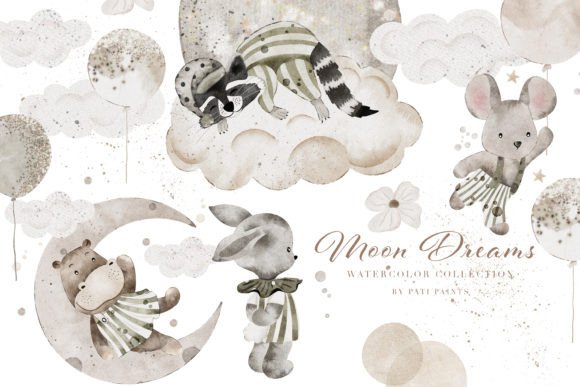
Digital clipart varies wildly in quality. The Moon Dreams Watercolor Collection distinguishes itself through its authentic, hand-painted style. Unlike vector graphics that can feel sterile, these watercolor elements bring warmth and organic texture to projects. This collection includes sleeping rabbits, adorable hippos, and badgers immersed in dreams, all rendered with accuracy and love. For entrepreneurs and hobbyists alike, these assets provide a shortcut to professional-looking results without requiring advanced illustration skills.
The versatility of the collection is a major draw. It is not limited to a single use case. Whether you are designing baby shower invitations, creating patterns for kids' clothing, or decorating a blog, the cohesive style ensures brand consistency. Yet, the presence of high-resolution files does not guarantee a successful outcome if the user ignores fundamental design principles.
Common Mistakes When Using Digital Watercolors
Even with premium assets like the Moon Dreams Watercolor Collection, users often make avoidable errors. Recognizing these pitfalls early can prevent frustration and additional costs.
Ignoring Resolution and DPI Requirements
One of the most frequent mistakes involves misunderstanding resolution. This collection provides images at 300 DPI (dots per inch), which is the standard for high-quality printing. A common error is resizing these images significantly larger than their original dimensions in software like Photoshop or Canva. When you stretch a raster image beyond its intended size, it becomes pixelated and blurry. This ruins the delicate watercolor edges that make the art appealing.
Better Approach: Always check the original pixel dimensions of the PNG files before placing them in your layout. If you need a large poster, ensure the element is used at or near its native size. For web use, where 72 DPI is standard, you can safely downscale, but never upscale beyond the original quality.
Overlooking Transparent Backgrounds
The collection includes 50 watercolor elements in PNG format. PNGs support transparency, allowing you to layer elements seamlessly. A frequent oversight is placing these elements on clashing backgrounds without adjusting opacity or blending modes. Watercolor art relies on soft edges and subtle gradients. Placing a soft rabbit illustration on a harsh, solid black background can look amateurish if not handled with care.
Better Approach: Use light, pastel, or textured backgrounds that complement the watercolor aesthetic. Experiment with blending modes such as "Multiply" or "Overlay" to integrate the illustrations naturally into your design rather than having them float awkwardly on top.
Misusing Seamless Patterns
The Moon Dreams Watercolor Collection includes 10 seamless patterns in 12x12 inch formats. Users often apply these patterns as full-background fills without considering visual hierarchy. A busy pattern can overwhelm text or focal points, making invitations or cards difficult to read. Additionally, some users fail to tile the pattern correctly, resulting in visible seams that break the illusion of continuity.
Better Approach: Use seamless patterns sparingly. Consider using them for borders, envelope liners, or as a subtle background with reduced opacity. Always preview the tiled result at 100% zoom to ensure there are no visible breaks in the design.
Maximizing Efficiency with Pre-Made Components
Time is a valuable resource for freelancers and small business owners. This collection includes 6 ready-to-use illustrations and 3 pre-made cards in 11x16 JPG format. A missed opportunity here is treating these as static images that cannot be customized. Many users assume they must build every project from scratch, ignoring the time-saving potential of these pre-composed layouts.
Practical Advice: Use the pre-made cards as templates. You can overlay your own text, change color balances, or crop specific sections to create new variations. This approach maintains the professional composition while allowing for personalization. For example, a pre-made card featuring a sleeping hippo can be adapted for a birthday invite, a thank-you note, or a nursery wall art print with minimal effort.
Choosing the Right Format for Your Project
Understanding file formats is crucial for optimal results. The Moon Dreams Watercolor Collection provides both PNG and JPG files. Knowing when to use each is essential for maintaining quality.
- PNG: Best for individual elements (the 50 watercolor items) because it supports transparency. Use these when layering images in design software.
- JPG: Ideal for the seamless patterns and pre-made cards where transparency is not needed. JPGs generally have smaller file sizes, which is beneficial for web uploads and email attachments.
Using a JPG for an element you intend to place over a photo will result in a white box around the image, requiring extra editing steps to remove. Conversely, saving a complex pattern as a PNG might result in unnecessarily large file sizes for web use. Choose the format that aligns with your specific output needs.
Evaluating Suitability Before Purchase
Before integrating any asset library into your workflow, assess your specific project requirements. The Moon Dreams Watercolor Collection is tailored for soft, whimsical, and child-friendly themes. It may not be suitable for corporate branding or high-contrast modern designs. Ask yourself:
- Does the watercolor style align with my brand identity?
- Do I have the software capability to edit PNG and JPG files?
- Am I creating print products (requiring 300 DPI) or digital-only content?
If you are creating fabric prints or large-format posters, verify that the individual elements are large enough for your intended use. The high resolution provided is excellent, but physical print size depends on the original pixel dimensions. Contact the creator if you have specific sizing questions; responsive support is a key indicator of a reliable digital product.
Final Thoughts on Quality and Usability
The Moon Dreams Watercolor Collection offers a robust toolkit for creators seeking authentic, high-quality watercolor assets. By avoiding common pitfalls related to resolution, layering, and format selection, you can ensure your projects look professional and polished. Whether you are designing nursery wall art, custom gifts, or digital scrapbooking pages, the key lies in respecting the integrity of the original artwork while applying sound design principles. Take the time to understand the tools you are using, and let these handmade elements enhance your creative vision rather than complicate it.